How to turn off the Zoom app dock

Business Operations Get my free newsletter

Do you spend a lot of time in Zoom meetings? I do. And when the Zoom app dock showed up in a coaching call yesterday, my client and I were a bit flabbergasted.

“WTF 😆!” is a fair approximation of our reaction.

Anyways, I poked around and found out how to turn it off. With the below magical incantations, the app dock should disappear for a while. It’ll probably show up again someday when the app updates. Until then, you can banish it with these steps:

  1. Launch Zoom and start a meeting
  2. Click the ... below the ‘app dock’
  3. Uncheck the ‘show in every meeting’ setting (that’s helpfully toggled on by default)
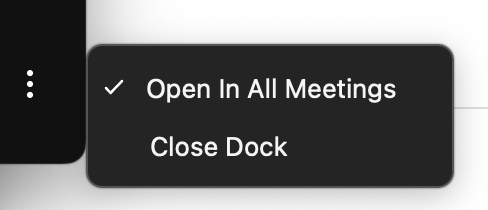
  1. Click the ... again
  2. Click the ‘close’ option to close the app dock in your current meeting

Excelsior!

Kai

You made it this far, how about subscribing?

Have new posts sent directly to your email by subscribing to my newsletter. No charge, no spam, just good times.

No spam. Unsubscribe at any time.

Recommended Resource

Initial Call Script

$30

Know exactly what to say on your sales calls. Learn the exact words to use on your initial calls to qualify leads and get great clients.

Learn More →

Who’s Behind This

Hi, I’m Kai Davis. I’m a digital marketer who writes about how solo consultants and founders can market themselves like authorities, fill their pipelines, and launch products. You can read more about me here.

I own and run DoubleYourEcommerce.com, a growth marketing consultancy for Shopify and Shopify Plus stores looking to grow with SEO.

On this site, I offer services to help solo consultants market themselves and attract more leads. I also have products, books, courses, and templates available to help you.

Explore My Services